- This topic has 6 replies, 3 voices, and was last updated 7 years, 11 months ago by
R.Meggie B.Harvey.
-
AuthorPosts
-
R.Meggie B.Harvey
ParticipantHi CODAP team,
I recently tried uploading two different data sets, one with coordinates and the other with state boundaries, and was not able to get the map to populate the data. Is there a way that I need to format the data so that it can appear in the map?
Thanks!
February 22, 2018 at 5:14 pm #458 Bill FinzerKeymaster
Hi Meggie,
Thanks for this question.
Regarding coordinates: CODAP looks for attributes with names that suggest latitude and longitude.
For latitude these are: ‘latitude’, ‘lat’, ‘Latitude’, ‘Lat’, ‘LAT’, ‘LATITUDE’, ‘LATITUD’, ‘latitud’
And for longitude these are: ‘longitude’, ‘long’, ‘lng’, ‘Longitude’, ‘Long’, ‘Lng’, ‘LONG’, ‘LON’,
'LONGITUDE', 'LONGITUD', 'longitud'
Once you have attribute names CODAP can recognize, making a map should show points for each case. (Close any maps you have open first.)
I’ll answer the question about boundaries in a following post.
Bill
February 22, 2018 at 5:24 pm #459Bill FinzerKeymasterRegarding state boundaries, let’s assume you have an attribute whose values are names of states. Let’s say the name of this attribute is State.
Now you need an attribute that whose values are the boundaries themselves. The name of this attribute can be any of the following: ‘boundary’, ‘boundaries’, ‘polygon’, ‘Boundary’, ‘Boundaries’, ‘Polygon’
Finally, you write a formula for this boundary attribute: lookupBoundary(US_state_boundaries,State)
After you accept this formula you should see for values small blue polygons that represent the boundaries for each of the states.
Hope this helps,
Bill
February 22, 2018 at 5:36 pm #460 Dan DamelinKeymaster
Here’s an example doc that shows how to use the lookup function to get state boundaries. This was made by starting from an empty table and following Bill’s instructions.
February 22, 2018 at 6:34 pm #461ParticipantThank you Dan and Bill–that was really helpful. I was able to get the state data to work with no problem. I am still having trouble with the coordinates, however.
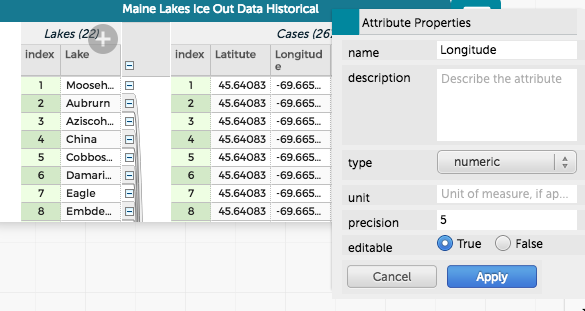
I have attached a screenshot of my table with attributes labeled as “Latitude” and “Longitude” showing the attribute properties as well. Any suggestions?
Thanks again!
Attachments:
February 22, 2018 at 8:35 pm #463Bill FinzerKeymasterLooks like Latitude is misspelled?
February 23, 2018 at 1:44 pm #464ParticipantThat did it–I must have checked my spreadsheet a dozen times and still missed the misspelling. Arg. Thanks for catching it!
-
AuthorPosts
- You must be logged in to reply to this topic.