- This topic has 6 replies, 3 voices, and was last updated 4 months, 2 weeks ago by
 Dan Damelin.
-
AuthorPosts
-
 traci_higgins@terc.eduParticipant
I’ve been working on a set from the 2020 Census data in the micro data plug in. We would like to be able to explore patterns in when people immigrated to the US in a social studies context. (We are exploring patterns for 4 states, 4000 cases total). Given the social studies context, we aren’t at leisure to teach some of the details of data cleaning. I have been trying to replace immigration year of 0 with an empty cell, but when I try to use the function, if(expression, value_if_true, value_if_false) i get errors. I think I fixed my initial syntax error and that the correct formula is if (‘immigrate-year’ = 0, ” “, ‘immigrate-year’), but now CODAP crashes every time I try to run the function. Is it an issue with the function? If not, is there a way to turn the CODAP file into an Excel file?
October 1, 2025 at 4:28 pm #13337 Bill FinzerKeymaster
Hi Traci,
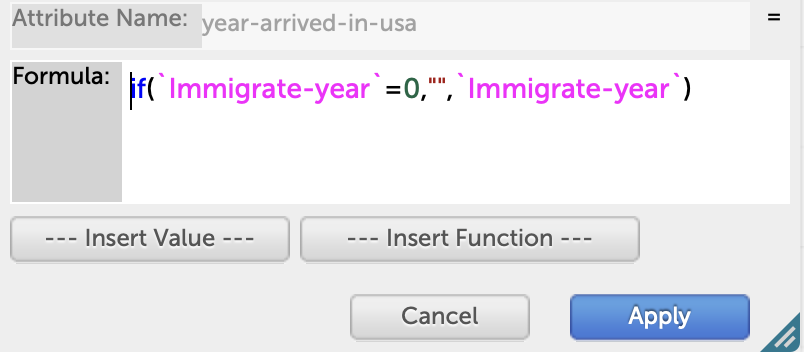
I just tried your proposed solution and it worked for me. I’ve enclosed a screenshot of the formula editor so you can compare. The quotes are very tricky as I’m sure you know. The attribute names require back-tic quotes so that the hyphen is not interpreted as a minus sign. And I would suggest that you use an empty string with no space as the empty value.
It’s disturbing that you were able to crash CODAP. Can you email me a document that does that so we can track down the problem?
Thanks, Bill
Attachments:
October 6, 2025 at 3:30 pm #13375traci_higgins@terc.eduParticipantHi Bill,
Thanks for the screen shot. My coding experience is pretty limited so I really appreciate the tips on the syntax. I think I may have had an extra space. However, when I entered the correct formula it crashed. I tried creating a new document with just 3 states (and 3000 cases) and it still crashed when I tried to apply the formula. I am attaching the document with 4 states that I was hoping to apply the formula to (rather than replacing all the 0 by hand!)
Thanks!
Traci
October 6, 2025 at 4:42 pm #13377Dan DamelinKeymasterTraci I don’t see any attachment. If you make a share link and add that to the post that might be the easiest way for us to see the issue.
October 8, 2025 at 11:52 am #13417traci_higgins@terc.eduParticipantHere is the shared link: <span style=”background-color: #eeeeee; color: #000000; font-family: Montserrat, sans-serif; font-size: 12px; white-space: pre;”>https://codap.concord.org/app/static/dg/en/cert/index.html#shared=https%3A%2F%2Fcfm-shared.concord.org%2FMhD2ua7F3otmXbxWyRnY%2Ffile.json</span>I look forward to your suggestions!
Traci
October 13, 2025 at 3:22 pm #13462traci_higgins@terc.eduParticipantI tried to respond with a link, but am not seeing that response now. I’ll try again: <span style=”color: #000000; font-family: Times; font-size: medium;”>https://codap.concord.org/app/static/dg/en/cert/index.html#shared=https%3A%2F%2Fcfm-shared.concord.org%2FMhD2ua7F3otmXbxWyRnY%2Ffile.json</span>
Thanks!
Traci
October 22, 2025 at 3:56 pm #13578Dan DamelinKeymasterTraci, your posts got caught by our spam filter, which is why we didn’t see them. In the link you sent it looks like you were already able to remove the zeros from the “immigrate-year” column. Are you all set now?
P.S. another way to do what you wanted to do would have been to drag the immigrate-year attribute all the way to the left in the table, creating groupings by immigrate-year. You could then change “0” to blank or whatever you want, and then move the attribute back to where it was.
-
AuthorPosts
- You must be logged in to reply to this topic.